AML screening, company registry and monitoring
What automatic screenings are performed for companies and their members upon application submission?
Upon submission, the system automatically runs the checks that are enabled for your instance and in the KYC template. For companies, these can include sanctions, adverse media and PEP checks, and a company registry search.
For members of corporations (such as directors, UBOs, and shareholders), the system can run sanctions, adverse media and PEP checks. If configured in the member's KYC template, ID document verification, ID data verification and selfie checks, including a passive liveness check, are also triggered.
What does Sanctions Screening mean?
- No result: Higher level of trust in the applicant as according to the data the applicant doesn't appear in any sanctions list.
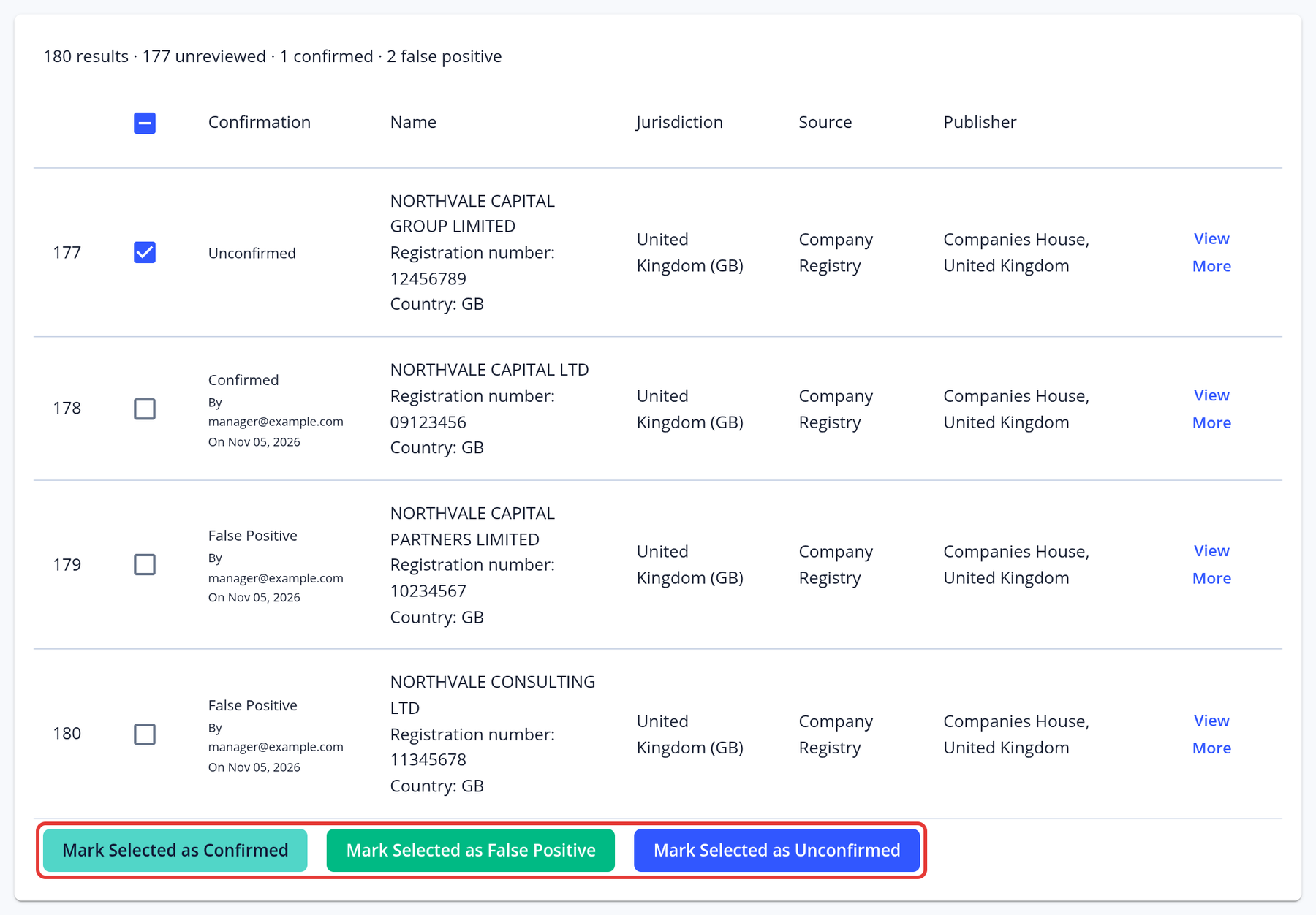
- Positive result(s): Possible involvement in illegal activities or risk to be involved. Your compliance team will have to analyze the data and take a decision accordingly (for example, double check the name, country and date of birth is the same to avoid a false positive match).
What Sanctions Screening lists are used by KYC-Chain?
For detailed information about our standard and advanced AML screening solutions, contact your account manager.
What do I do if one of my applicants appears in one or multiple sanctions screening lists?
Make sure that the applicant in question matches the individual identified by the sanctions screening list. This can be achieved by looking at the names and pseudonyms identified via the sanctions screening list. Click on the “View More” button and determine whether it is an exact, or only potential, match. You may need to use other details, such as name, country of residence and date of birth, to rule out a false positive. If there is a confirmed match, you can refer to the sanctions screening list to determine the risk based on your compliance program.
What are the troubleshooting steps when automated adverse media results are not found by the system?
If you are expecting adverse media results but none are being found automatically, please open a support ticket. Our team will need to review your application details and template settings. Note that the Fuzziness setting doesn't filter adverse media results, so changing it won't make adverse media hits appear. We will need to investigate to determine the cause.
How can I screen members of a corporation?
Our system automatically runs sanctions screening on members of corporations (directors, UBO, shareholders, etc.) You can find the results in the individual KYC Process for each member in the "Members" tab.
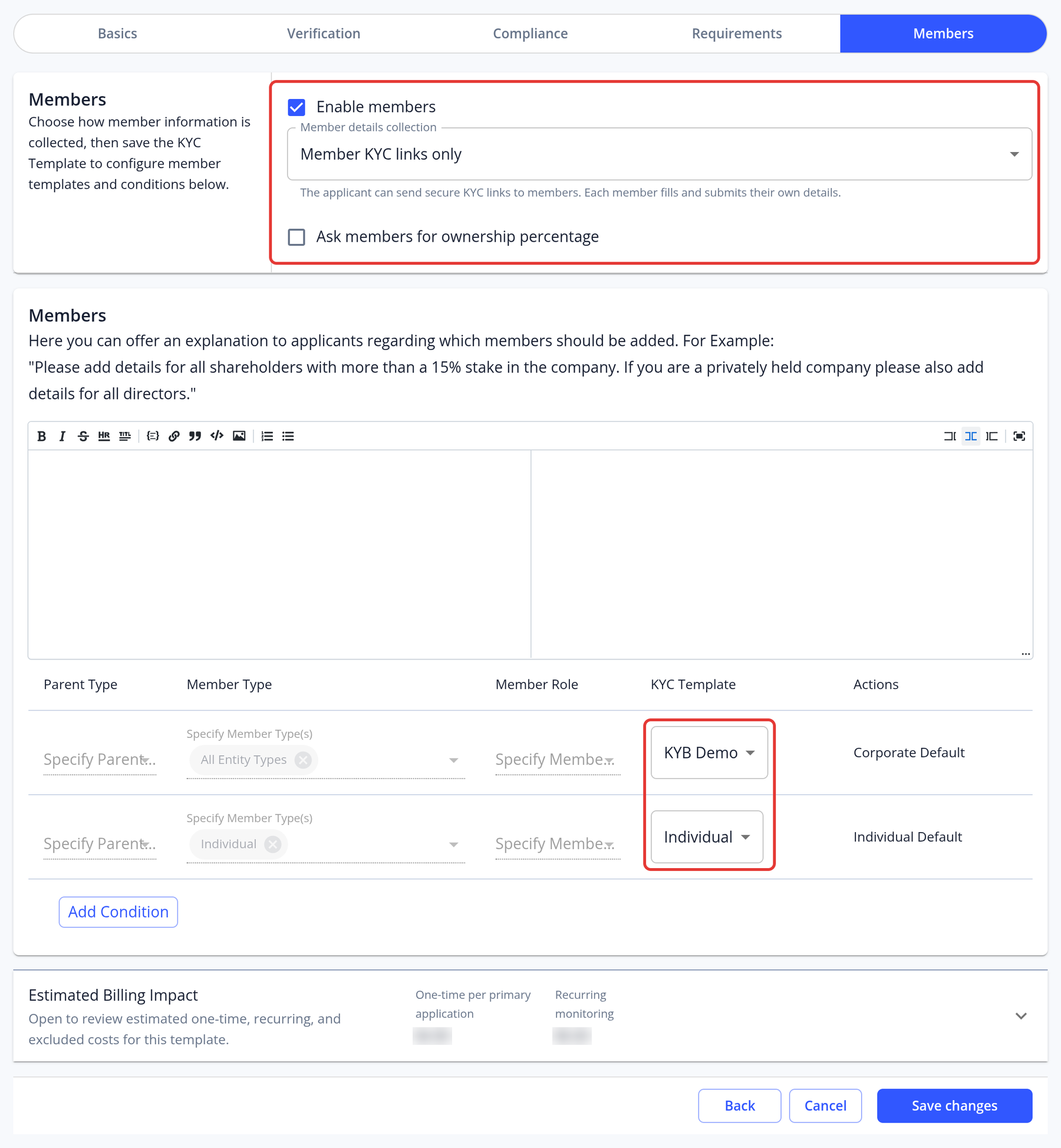
Step 1: Open your corporate KYC template and go to the Members step. Step 2: Tick Enable members and, if you need it, Ask members for ownership percentage. Step 3: In the conditions table, choose the KYC template for individual members (this should be an individual KYC template) and for corporate members, then click Save changes.
In the examples below, the Company Check template will be used to perform KYB checks, while the Individual KYC template linked to the Company Check will be used to run KYC on corporate members, including all roles such as UBO, Director, and Shareholder. This setup is fully customizable—you can configure member types and roles by adding new conditions as needed.
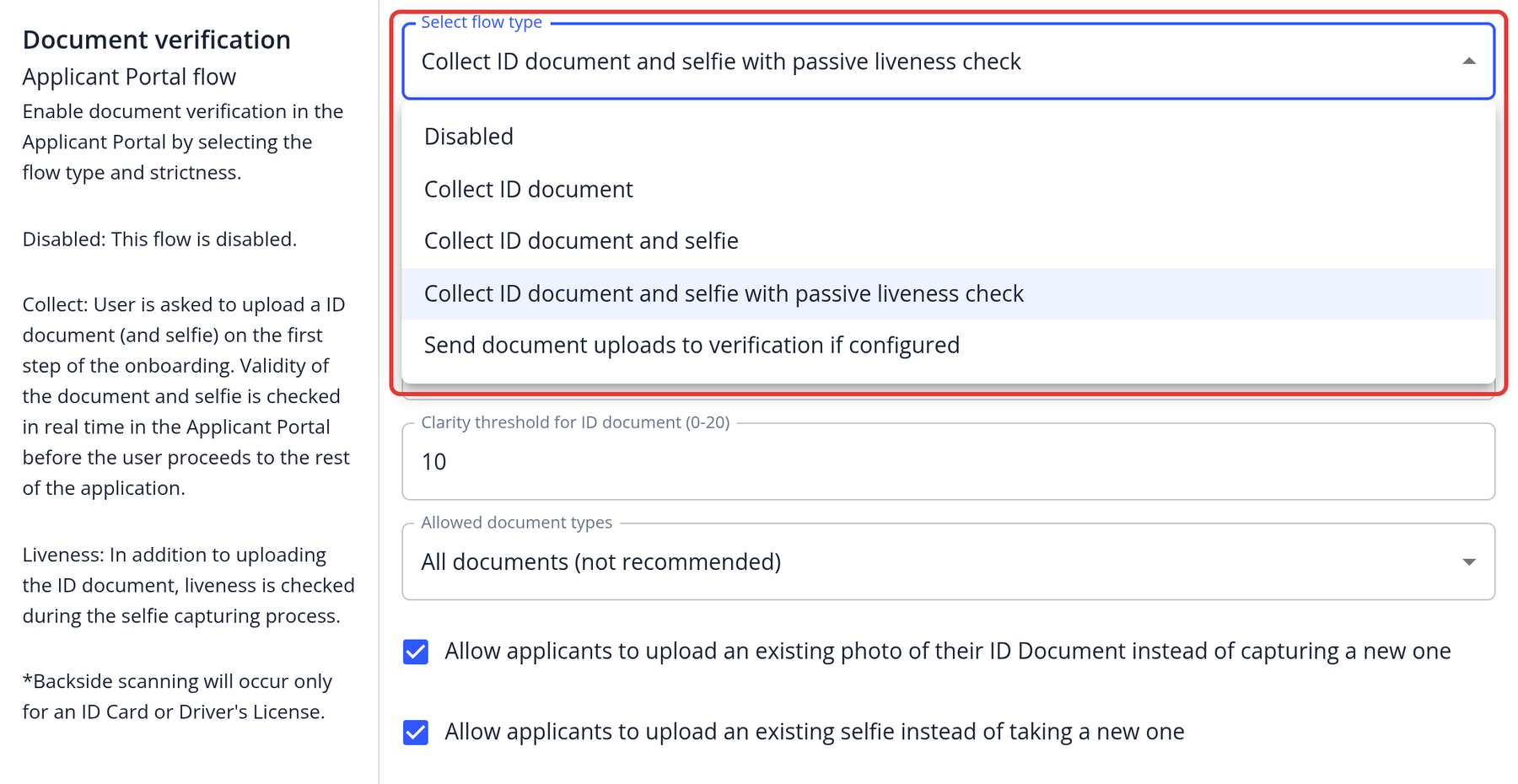
Please also ensure that when adding a linked Individual KYC template for corporate member screening, ID document verification is properly enabled so that both the ID document and selfie checks, including a passive liveness check, are triggered. As this setup can be complex, we strongly recommend contacting a customer support representative to verify your configuration and avoid any potential misconfiguration.
When does ongoing AML monitoring begin for an application?
Monitoring starts once the application has an AML check result: the check is run again when that result is older than the interval set for the application's risk category. See Ongoing AML Monitoring for details.
What does Company Registry mean?
- No result: This means that the company name and jurisdiction that we searched did not return any results from the relevant companies registry. The company might not exist, or the information provided by the applicant might be incorrect. Your compliance team should confirm that we support the relevant jurisdiction and then double check with the applicant or proceed however you see fit.
- Result: This means that the company exists, and you can see all its details in our system. It is important that your compliance team compares the information provided by the applicant and the information available in the official registry to ensure that the search result is the same entity as the one applying.
How can I obtain company registry information for British Virgin Islands (BVI) entities?
If company registry search is enabled for your instance, check what's available for BVI companies in KYC and AML coverage by country, or choose British Virgin Islands as the country on the Search Form tab of Search Databases: the form shows which company registry checks are available there.
- If search is available, search for the company as an Entity, then use View More on its result to view the company profile or Order Documents (see Search Databases). Viewing profiles and ordering documents are charged.
- If search isn't available, or company registry search isn't enabled for your instance, open a support ticket with the company name, legal entity type, registration number and date of incorporation. Our team will order the documents for you and let you know when they're ready; this can take a couple of days.
What are the best practices, configurations, and methodologies for ensuring the comprehensive coverage and accuracy of automated Sanctions, PEP, and Adverse Media screening, especially in complex scenarios?
AML Checks (Sanctions, PEP, Adverse Media):
- Enable ongoing monitoring to ensure continuous compliance.
- Tune the Fuzziness setting (the lowest name-match score a result needs; higher is stricter) to balance missed name variations against false positives.
- Implement a manual review process for all flagged matches before making final decisions.
- Apply risk-based triggers so that higher-risk applicants undergo more frequent or stringent checks (automatic notifications)
- Maintain detailed audit trails of all checks, reviews, and outcomes for regulatory compliance.
ID Data Checks:
- Check which countries are covered before you enable the check: see KYC and AML coverage by country.
- Configure all relevant data fields to ensure thorough and accurate matching.
- Set up alerts for mismatches or suspicious data to prompt further review.
- Escalate uncertain or partial matches to manual compliance review.
ID Document Checks:
-
Collect ID Document and Selfie with Passive Liveness Check: Require applicants to submit an ID document and a selfie, with passive liveness detection enabled. This ensures the person is physically present and drastically reduces the risk of identity fraud or spoofing.
-
Restrict Uploading of Existing Photos: For maximum security, do not allow applicants to upload pre-existing photos of ID documents or selfies. Require real-time capture during the verification process—this supports liveness checks, prevents the use of stolen or manipulated images, and improves data quality.
-
Enable "Selfie with ID in Hand" Verification: Prompt applicants to take a selfie while holding their ID document. This step helps confirm that the individual possesses the actual document and further matches their identity in real time.
Summary of Recommended Settings:
- Enable collection of ID document and selfie with liveness check
- Enable "Selfie with ID in Hand" verification
- Disable uploading of existing images—require real-time capture
Wallet Screening Checks (Crypto Address Screening):
- Screen submitted blockchain wallet addresses for sanctions, illicit activity and risk levels at onboarding: fetch a report from the application's Wallet Screening tab.
- Conduct periodic re-screening of wallet addresses, especially for high-value or high-risk users. (Transactions monitoring feature is not yet available)
- Carefully review wallet reports and document all decisions and outcomes in the audit trail.
Summary: Automate checks where possible, use ongoing and interval-based monitoring, ensure data sources are current and comprehensive, implement structured manual review processes, and maintain complete audit records. Adjust screening workflows and strictness according to the risk level of each applicant or transaction.
If you need a detailed checklist or configuration guide for any specific workflow, please let us know—we’re happy to assist!
What is the platform's threshold for Suspicious Activity Report (SAR) generation?
KYC-Chain itself does not automatically generate Suspicious Activity Reports (SARs) or enforce a specific threshold for SAR generation. Instead, the platform equips your organization with the tools to monitor, review, and flag suspicious activities according to your compliance program and applicable regulations.
How it works on KYC-Chain:
- Automated checks (sanctions, PEP, adverse media, ID verification and others), risk scoring and ongoing AML monitoring help identify potential risks or suspicious behavior.
- You can set up risk assessment criteria and thresholds in the risk scoring configuration.
- Managers can add notes, label applications and review them when suspicious activity is detected.
Reporting responsibilities: It remains the responsibility of your compliance/AML team to determine what constitutes suspicious activity and when to generate and submit a SAR to authorities, based on your jurisdiction’s regulatory standards (such as transaction values, behavioral red flags, or other compliance triggers).