Sybil checks
Sybil checks stop the same person from applying more than once with the same KYC template. There are three options, all enabled by default, under Sybil Checks on the Verification step of a KYC template:
- One Application Per Applicant: An applicant can't start a second application with the same template while they have one that isn't cancelled. The system shows "This user has an existing application". No application is cancelled.
- Enforce Unique Name + DOB: When an individual applicant submits, the system compares their first, middle and last name, date of birth and the IP addresses recorded in the audit trail with other applications of the same template and type. If an application that isn't cancelled has the same data, the new application is cancelled before any data checks run. Member applications, re-opened applications and KYC refreshes are not checked.
- Enforce Unique MRZ: Compares the passport's MRZ (Machine Readable Zone) line or, for other ID documents, the issuing country with the personal number or document number, read during ID document verification. The check runs as soon as the ID document verification result is available, and again at submission. If another application of the same template has the same document, the new application is cancelled.

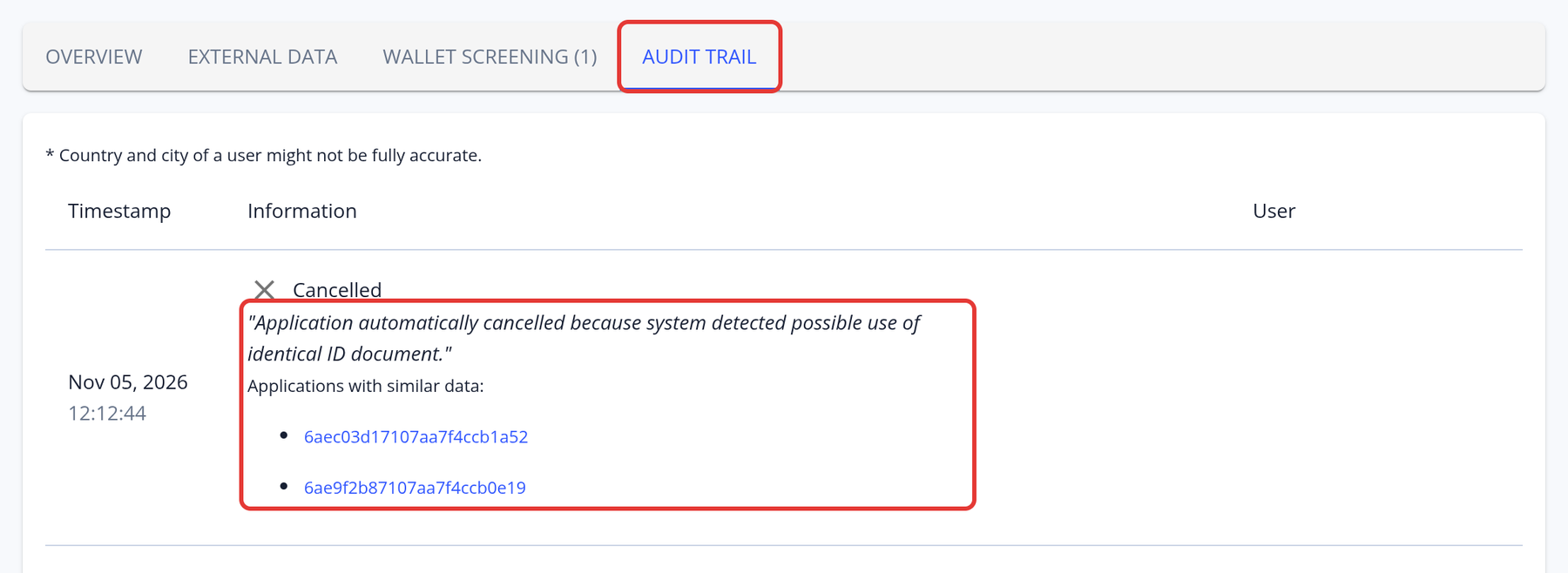
Note: When a sybil check cancels an application, the Audit Trail explains the cancellation and links to the applications with similar data:
How to disable sybil checks
Open the KYC template, go to the Verification step and find Sybil Checks. Untick the options you don't need (One Application Per Applicant, Enforce Unique MRZ and Enforce Unique Name + DOB, described above), then click Save & Next.