Document expiry monitoring
The Document Expiry Monitoring feature tracks the expiry dates of applicants' ID documents and takes action before a document expires. It helps keep approved applications compliant.
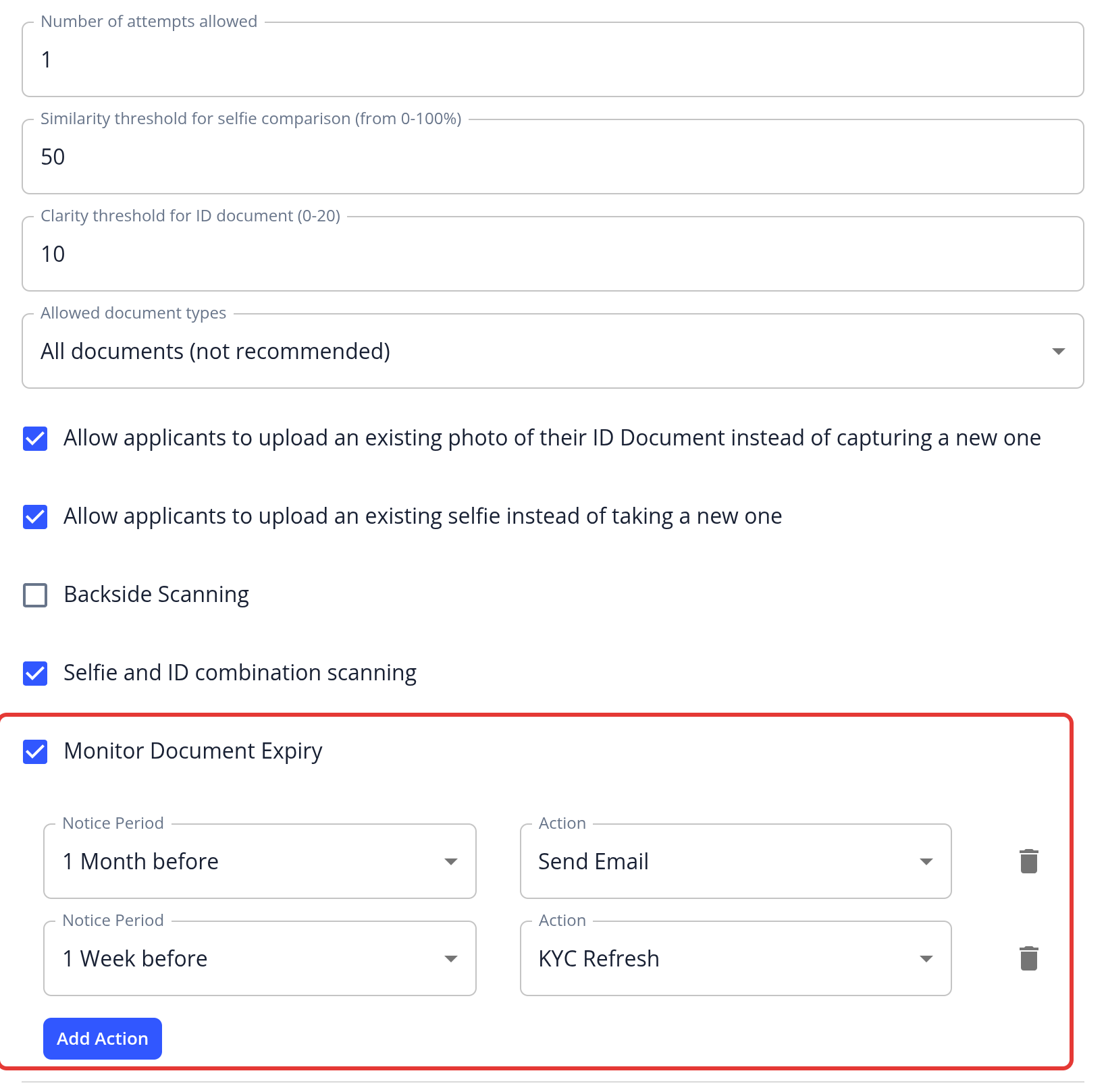
Where to set it up: Open an individual KYC template, go to the Verification step, and tick Monitor Document Expiry in the Document verification section. You can also enable it on individual document requirements (see Add & Edit Documents). If you don't see the option, the feature isn't included in your package.
Actions: Each action combines a Notice Period with an Action. Click Add Action to add more actions, up to 5. For example, you could email managers 1 month before a document expires, and start a KYC Refresh 1 week before.
- Notice Period: 1 Week, 1 Month, 2 Months, 3 Months, 4 Months, 6 Months or 1 Year before the expiry date.
- Send Email: Sends an email to managers about the upcoming expiry.
- KYC Refresh: Reopens the approved application and emails the applicant to redo their KYC process.
By default, there is one action: Send Email, 1 Month before.
How it works: Once a day, the system checks the ID documents of approved applications. When a document reaches a notice period, the matching action runs.